
I didn’t want to think about my marketing site.
Three months ago I was staring at a blank repo, trying to decide what to build my landing page and blog on. I just wanted something that would work, stay out of my way, and let me focus on building actual product features.
I went through a lot of options. Most of them were overkill for what I actually needed. This is the story of how I ended up on Astro, and why it’s been the quietest, least stressful technical choice I’ve made.
“The best framework is the one you never think about.”
The Decision Matrix: Choosing Between Strapi, Custom Code, and Astro
I had three real options. None of them were perfect, but all of them solved different parts of the problem.
The Contenders:
- Set up Strapi headless CMS
- Vibe-code everything from scratch
- Move to Astro
The Rubric: What Matters For Solo Founders
I wasn’t optimizing for benchmark scores or trendy features. I was optimizing for exactly four things:
- I should forget this stack exists. It should never require my attention.
- Writing a blog post should be as simple as saving a Markdown file.
- Changing text on the landing page should take less than 60 seconds.
- It needs to handle i18n without making me want to throw my laptop.
That’s it. That’s the entire list. No other criteria mattered.
Let’s give each one a fair fight.
Option 1: Strapi Headless CMS - Great For Teams, Overkill For One
This seemed like the sensible choice at first. Everyone says headless CMS is the right way to do marketing sites. Separate content from code, nice admin UI, non-technical people can edit content.
I set it up. It took a day. I got content models working. I got the API returning data. And then I realized something:
I am the only person who will ever edit this content.
There is no marketing team. There is no content writer. There’s just me. And for a solo founder, the admin UI is actually slower than just opening a text file.
Every time I wanted to change a line of text, I had to:
- Log into Strapi
- Wait for the dashboard to load
- Find the right content entry
- Make the change
- Publish it
- Rebuild the frontend
And then I still had to deploy it. For one person, this was adding overhead, not removing it.
Plus i18n in Strapi? It works, but it’s heavy. You have to configure every field for every language, manage translations through the UI, and handle the API responses carefully. It felt like using a sledgehammer to hang a picture.
Option 2: Vibe-code Everything - Simple Until It Isn’t
This was the tempting option. After all, I’d just vibe-coded my entire backend. Why not do the same for the frontend? Just write some HTML, some CSS, maybe a little vanilla JS. No frameworks, no dependencies.
I actually built the first version this way. It was fast. It was simple. And then I needed to add a second blog post.
And then I needed to add i18n.
Suddenly I was writing all the boring glue code that frameworks solve. Generating index pages. Creating RSS feeds. Handling draft posts. Managing language versions of every page.
It worked. But I was spending time writing CMS features instead of building my product. I could have kept going, but it would have been a constant maintenance tax. Every new feature on the marketing site would mean writing more boilerplate.
Option 3: Astro - The Framework That Disappears
I ignored Astro for a long time. I thought it was just another frontend framework that would be replaced in 18 months.
Then I tried it.
npm create astro@latest ran. 10 seconds later I had a working site.
I made a change. The browser updated before I finished alt-tabbing.
I added a blog post. Just a Markdown file in src/content/blog. No config. No code. It just worked.
I deployed it. It built in 7 seconds. Not 7 minutes. 7 seconds.
And then I forgot about it. For a month. I didn’t touch it. I didn’t update any dependencies. I didn’t think about it at all. And when I came back, it still worked exactly the same way.
That’s the feature. That’s the selling point. No one ever talks about that.
“The best infrastructure is invisible. The best tool is the one you forget exists.”
Astro Implementation Deep Dive: Zero JS By Default
The biggest win wasn’t performance. It was invisibility.
Here’s what my marketing site stack looks like today:
Zero JavaScript Sent To Clients By Default
My landing page sends zero JavaScript to the client. Zero.
No hydration. No runtime. No framework boilerplate. Just HTML and CSS. It loads in 300ms on 3G. No one notices. But everyone notices how fast it feels.
When I actually need interactivity? When I need a pricing calculator or a demo form? I just add an island:
---
import PricingCalculator from './PricingCalculator.tsx'
---

<div class="pricing-section">
  <PricingCalculator client:load />
</div>
That’s it.
The rest of the page is static HTML. Only the calculator loads React. Only when it’s needed. I don’t have to think about it. It just does the right thing.
Content Collections Are The Killer Feature
This is the feature that sold me.
When I want to write a blog post, I create a file: src/content/blog/why-im-using-astro.md
I add some frontmatter:
---
title: Why I'm Using Astro For Landings And Blog
publishedAt: 2026-04-09
---
And I write. That’s it.
No CMS. No database. No GraphQL queries. No API calls. Just a Markdown file. And Astro automatically:
- Validates all the frontmatter fields
- Generates type definitions
- Creates the index page
- Creates the RSS feed
- Handles draft posts
I don’t have to write a single line of code for any of this. It just works.
“For solo founders, the best CMS is a text editor and git.”
i18n Was Actually Easy (Surprisingly)
This was the surprise. I expected i18n to be the nightmare part. It wasn’t.
Astro’s i18n integration is simple. You create folders for each language:
src/
  pages/
    en/
      index.astro
      about.astro
    es/
      index.astro
      about.astro
You add a tiny bit of config:
// astro.config.mjs
export default defineConfig({
  i18n: {
    defaultLocale: 'en',
    locales: ['en', 'es', 'de'],
  },
})
And that’s basically it. It handles language switching, relative paths, and SEO tags automatically. No third party plugins. No weird configuration. Just works.
For shared text, I made a simple translations object that I import where needed. No fancy libraries. 50 lines of code total.
What I Thought Would Be Hard That Turned Out Easy
Deployments. I just push to GitHub. Cloudflare Pages builds it in 7 seconds. Done. No config. No edge function nonsense. No cold starts. Cloudflare handles the CDN, SSL, everything. I never think about it.
Image optimization. npm install @astrojs/image. Done. It just works. Generates modern formats. Handles responsive images. No config.
Tailwind integration. npx astro add tailwind. Done. Works perfectly. No PostCSS config. No purging issues.
What I Thought Would Be Easy That Became A 3-Day Nightmare
Search. There is no good built in search for Astro. Every single 3rd party search plugin is either abandonware or costs $50/month. I ended up writing a tiny 100 line script that generates a search index at build time. It works fine. But it should have been built in.
Pagination. The built in pagination is weirdly opinionated. If you want anything that’s not exactly “10 posts per page” you end up fighting it. I spent two days getting it to work the way I wanted.
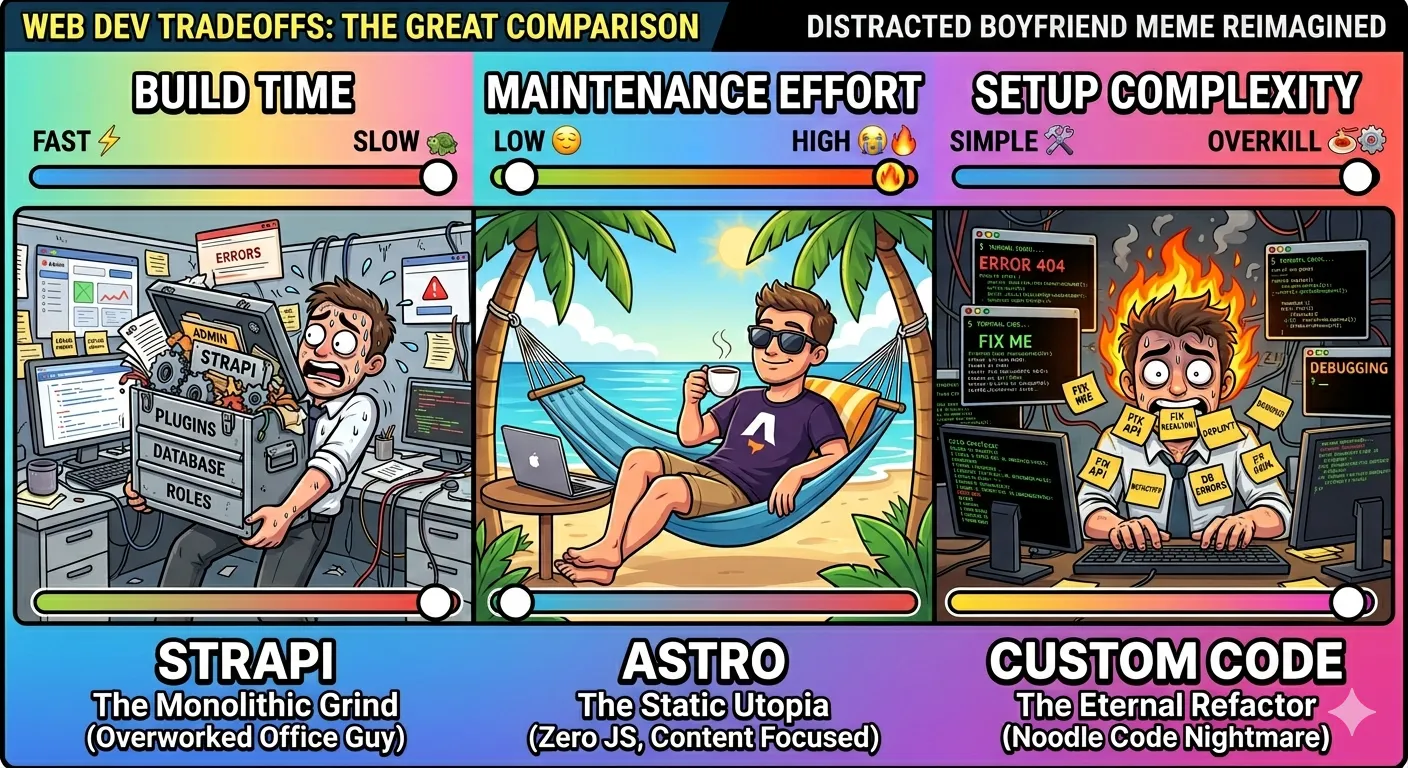
The Cost Of Admission: Astro Tradeoffs For Solo Founders
Every choice has tradeoffs. This is what I pay for using Astro.
- It’s only good for static content. If you try to build a full dynamic application in Astro, you will have a bad time. That’s not what it’s for.
- Smaller ecosystem. There are way more templates and examples for other frameworks.
- No guard rails. Astro will let you do stupid things. It will let you add 17 different frameworks to the same page if you want. It won’t stop you.
- Occasional breaking changes. Every major release breaks something minor. They’re usually small. They’re usually well documented. But they exist.
But you know what the alternative was? Either maintaining a whole CMS instance I didn’t need, or writing all the boring glue code myself.
The math works out.
The Verdict: Astro For Solo Founder Marketing Sites
For me, right now, this is the perfect tool for this job.
I can write and publish a blog post in 5 minutes.
I can change any text on the landing page in 30 seconds.
I can add a new language in an afternoon.
I haven’t had to touch the core site code in 6 weeks. It just works. It builds. It deploys. It never breaks.
This is the thing no one tells you about tool choices. The best tool is not the one with the most features. It’s the one you forget about.
The best infrastructure is invisible. The best framework is one you never think about.
Astro doesn’t want me to be part of its community. It doesn’t want me to tweet about it. It doesn’t want me to write blog posts about how great it is. It just wants to do its job and get out of my way.
That’s exactly what I need.
If you’re building a landing page. If you’re building a blog. If you’re building marketing content. If you’re a solo founder who just wants something that works and stays out of your way.
Stop overthinking it. Use Astro.
You will thank me when you forget it exists for 3 months.
Frequently Asked Questions
Why choose Astro over Next.js or Remix for marketing sites?
Next.js and Remix are excellent frameworks for dynamic applications, but they send unnecessary JavaScript to the client for static content. Astro delivers pure HTML by default, resulting in faster load times and zero runtime overhead for content that doesn’t need interactivity. For marketing sites and blogs, this performance difference translates directly to better user experience and SEO.
Can I use React components with Astro?
Yes! Astro supports partial hydration through Islands architecture. You can write interactive components in React, Vue, Svelte, or any other framework and only load them when needed. The rest of your page remains static HTML. This gives you the best of both worlds - static performance with dynamic capabilities where required.
How hard is it to migrate an existing site to Astro?
Migration difficulty depends on your current stack. For static sites built with HTML/CSS, you can copy-paste your existing code directly into Astro components. For React/Vue sites, you can gradually migrate components while keeping existing functionality. The Astro documentation provides excellent migration guides for most common frameworks.
External References
- Astro Official Documentation - Comprehensive guides and API references
- Astro Content Collections - Official documentation for content management
- Astro i18n Guide - Complete internationalization setup instructions
- Cloudflare Pages Integration - Deployment guide for Cloudflare