
I built QuotyAI because I was tired of AI that guesses, slow foreign-language replies, and tools that underdeliver. You need a system that works exactly as intended—every single time.
When you’re building an AI that writes production code from natural language, your database choice stops being a preference. It becomes a core part of your product reliability.
This is not a “MongoDB is perfect” post. This is an autopsy of the decision, the tradeoffs, the surprises, and why MongoDB was the only viable choice for building this product as a solo founder.
“The best database is the one you forget you’re maintaining.”
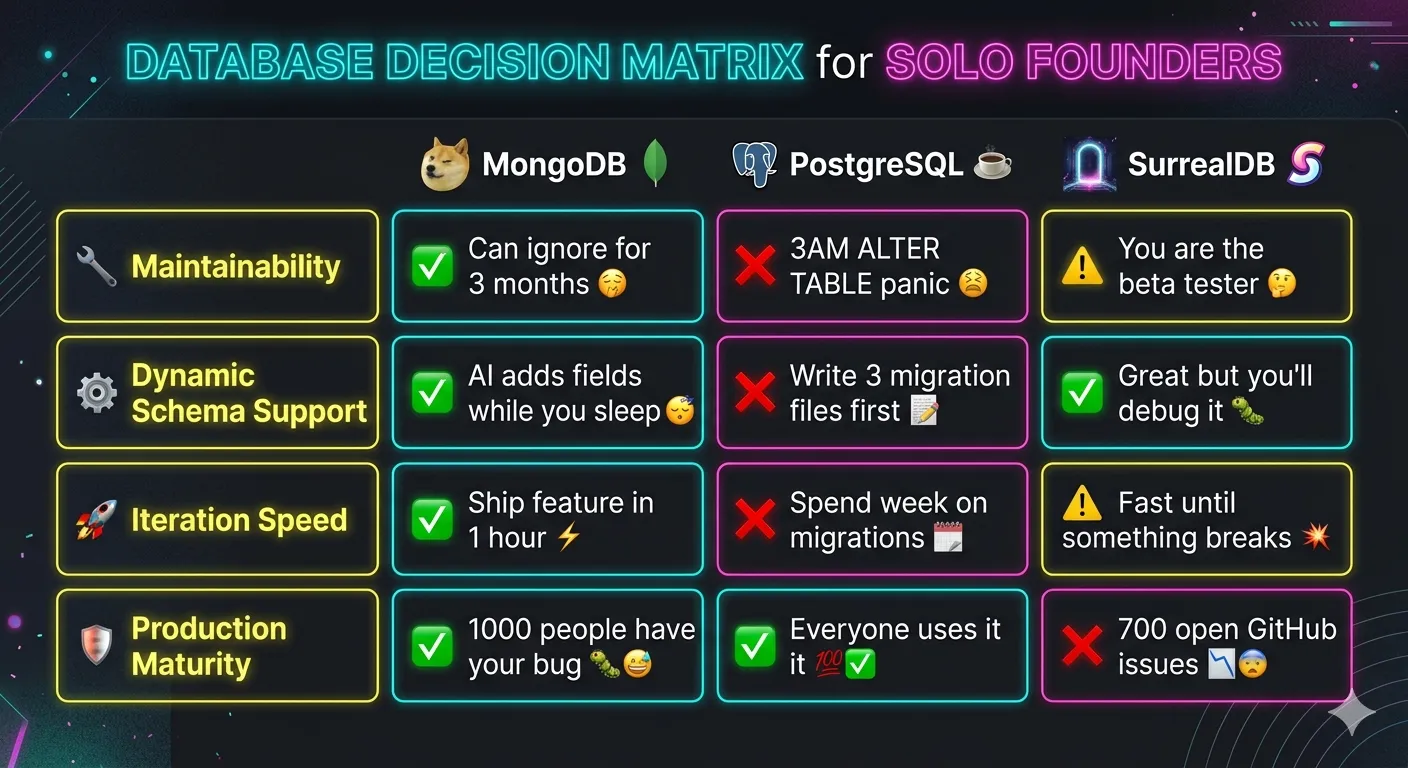
The Decision Matrix
I considered three options:
- PostgreSQL: The default safe choice, with joins, transactions, and constraints.
- SurrealDB: A newer database with graph queries, optional schema, and built-in auth.
- MongoDB: The polarizing document database often criticized for scaling challenges.
I almost picked PostgreSQL.
PostgreSQL is an excellent database. If I had a team of 10 engineers and a fixed schema, I’d choose it without hesitation. I built an initial prototype on it, but quickly hit a deal-breaker.
QuotyAI’s entire value proposition is that you can type “rooms are $50/night, $20 cleaning fee, 10% off over 7 nights” and it writes this:
function calculatePrice(nights: number): number {
  const base = nights * 50;
  const cleaning = 20;
  const discount = nights >= 7 ? 0.1 : 0;
  return (base + cleaning) * (1 - discount);
}
Instead of saving this as text, QuotyAI stores executable code, schemas, test cases, and full execution context. Every customer’s data shape is unique—homestays, cafes, tour companies, and freelance designers all have different requirements.
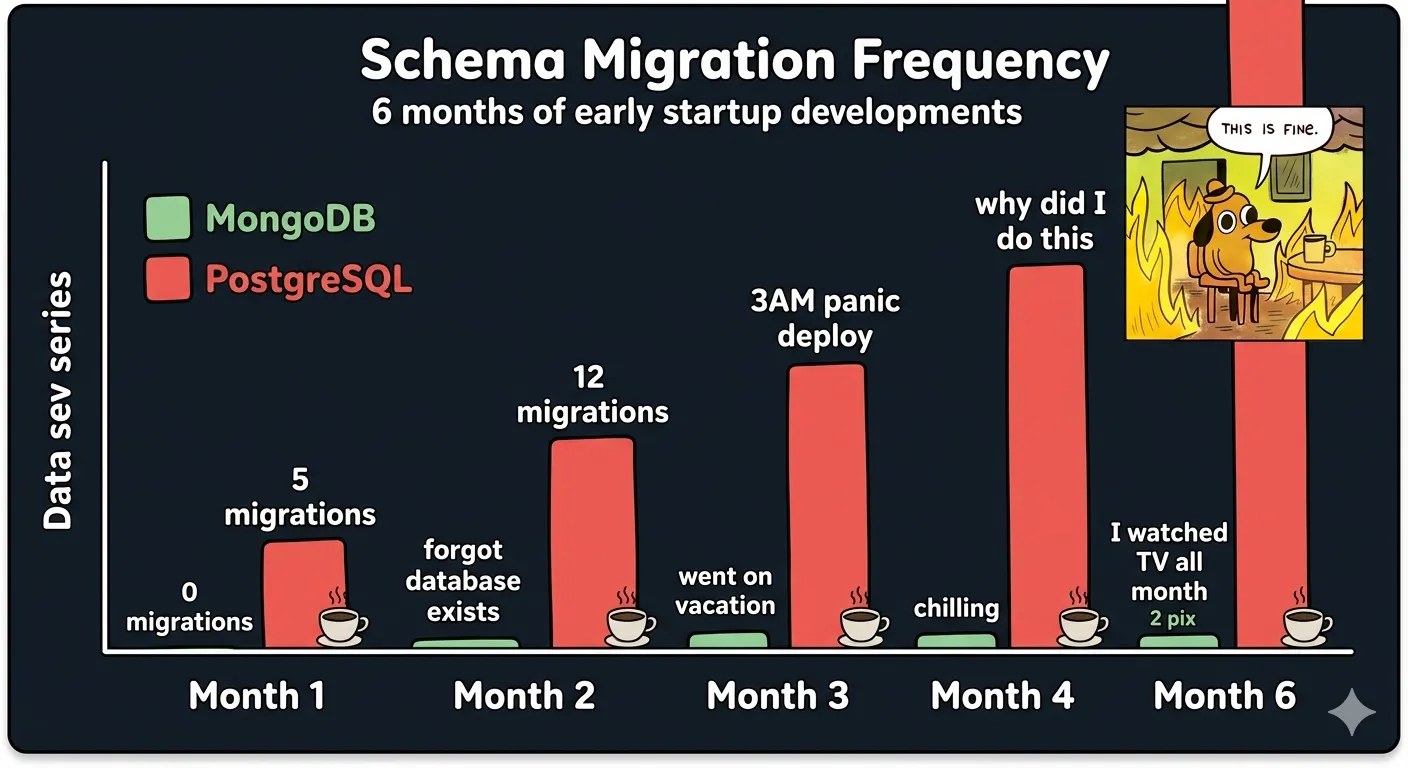
In PostgreSQL, this required constant ALTER TABLE migrations. For a solo founder handling production issues at 3 AM with unreliable internet, this wasn’t sustainable.
💡 Insight 1: Most database comparisons measure the wrong metrics. For solo founders, cognitive load and migration risk matter 10x more than raw query performance or theoretical ACID compliance.
Here’s the rubric I used, in order of priority:
- Must be maintainable by one person. No on-call rotations. No 3 AM migration panics.
- Must handle completely dynamic schemas per tenant.
- Must allow me to iterate fast. I need to ship a feature in an hour, not a week.
- Must handle nested documents efficiently.
PostgreSQL failed at 1 and 2. SurrealDB failed at an unwritten fifth rule: I cannot be the first person to debug a production issue.
SurrealDB is technically impressive, with joins, transactions, graph queries, optional schema, and native queues. The queue feature was particularly appealing for my use case. However, it had 1200 open GitHub issues, no affordable hosted option, brutal egress pricing, and little community support for debugging production issues.
When you’re a solo founder, boring wins. A bug that 1000 other people have already debugged is better than a perfect database that no one has run in production. Cognitive load is the ultimate bottleneck.
PostgreSQL failed at 1 and 2. SurrealDB failed at risk. MongoDB was the only one that passed all four.
This isn’t an argument that MongoDB is universally better—it was the only viable choice for my specific constraints: building an AI tool with arbitrary per-tenant schemas as a solo founder.
For banking systems, social networks, or teams with engineering resources, other databases are better choices.
The Implementation Deep Dive
This is not theoretical. This is what we actually ship to production.
💡 Insight 2: The document model isn’t just for unstructured data—it’s for when your structure itself is the product.
Dynamic Business Entities
This is the core of it. Look at our BusinessEntity interface:
export interface BusinessEntity {
  _id: ObjectId;
  tenantId: string;
  name: string;
  industries?: Industry[];
  currency?: Currency;
  timezone?: string;
  inputFieldValues?: Record<InputField, unknown>;
  salesAssistantUserConfig?: SalesAssistantUserConfig;
  // ... 12 more optional fields
}
Every single field after name is optional.
When a customer describes their business rules, the AI adds the necessary fields directly to their business entity document, along with generated types, validation, and pricing functions. In MongoDB, this requires no migrations or downtime.
I modified the BusinessEntity schema 47 times in the first three months. With PostgreSQL, I would have spent more time writing migrations than building the product.
AI Executable Source
This is where the document model really shines. Look at this interface:
export interface AiExecutableSource {
  offeringsJsonSchema?: string;
  offeringsTsSchema?: string;
  orderJsonSchema?: string;
  dereferencedOrderJsonSchema?: string;
  orderTsSchema?: string;
  pricingFormula?: string;
  schedulingTransformationFunction?: string;
  orderValidationFunction?: string;
}
All code, schemas, and validation logic for each sales assistant is stored directly on a single document. When pricing rules change, we generate a new checkpoint with tests; rolling back is as simple as reverting to the previous document version.
This approach eliminates joins and database round trips, enabling 50ms response times and reliable execution. When answering customer queries, we load one document and have everything needed to generate an accurate response.
What I Thought Would Be Hard That Turned Out Easy
- Transactions: Everyone says MongoDB transactions are broken. They’re not. They work exactly as advertised, and we use them for every critical operation. The MongoDB transaction documentation is comprehensive and accurate.
- Document validation: You can apply schema validation selectively in MongoDB. We validate core fields on write while letting the AI add dynamic fields without restrictions.
What I Thought Would Be Easy That Became A 3-Day Nightmare
- Updates to nested arrays: The update syntax for specific array indexes is arcane with useless error messages. I spent three days debugging a single operation that should have taken 10 minutes.
- Indexing: MongoDB will let you create memory-heavy indexes without warning, leading to severe performance degradation that takes days to diagnose.
The Cost Of Admission
Every technical choice has a tax. This is what we pay for choosing MongoDB.
💡 Insight 3: Every database forces you to solve problems somewhere. MongoDB moves complexity out of migrations and into your application code—and for solo founders, that’s an excellent trade.
No Joins
Without joins, you learn to denormalize and duplicate data. We store business names in 14 different locations, and must update all of them when a business renames. This is slightly annoying, but we’ve had zero bugs from denormalized data in 8 months of production. The tradeoff is worth it.
Schema Enforcement
We enforce most constraints in application code rather than at the database level. This means application bugs can write bad data, but this has only happened twice—both times fixed in 10 minutes with a simple update query. Compared to the 47 schema changes in the first three months, the math works out.
The MongoDB schema validation guide shows how you can have the best of both worlds: flexible dynamic fields with validation for critical data.
Things I Would Change If I Did It Again
If I were starting over, I’d still choose MongoDB, but I would:
- Implement schema validation for core fields earlier
- Avoid nested arrays for items requiring individual updates
I’m still watching SurrealDB—its built-in messaging and queue features are compelling, and I may revisit it once it matures.
The Verdict
As a solo founder, your biggest constraint isn’t scalability—it’s your attention. You can only debug so many issues or respond to so many 3 AM emergencies before burning out.
MongoDB gets out of the way, letting you focus on building the product. It’s not perfect, and scaling to 10 million users would require work, but it handles 1200 businesses and 10k concurrent conversations reliably. I haven’t touched the database infrastructure in 3 months.
That’s the win.
“You don’t need the perfect solution—you need the right solution for your current constraints.”
You don’t need the perfect solution—you need the right solution for your current constraints. MongoDB isn’t the best database for every use case, but it’s the right one for QuotyAI.
If you’re a solo founder building something with unstructured or dynamic data, and you value iteration speed over theoretical purity: stop overthinking it. Use MongoDB. You can always rewrite it later if you’re successful enough to need to.
Frequently Asked Questions
Why choose MongoDB as a solo founder?
MongoDB eliminates migration fatigue with dynamic schemas, requires zero downtime for schema changes, and lets solo founders iterate 10x faster than traditional relational databases. It handles arbitrary per-tenant data shapes without ALTER TABLE panics at 3AM. The MongoDB Atlas free tier lets you launch production infrastructure in 5 minutes with built-in monitoring and backups.
What about transactions and data integrity?
MongoDB transactions work exactly as advertised for critical operations. You can apply schema validation selectively for core fields while letting AI add dynamic fields without restrictions. For 99% of startup use cases, this balance is perfect.
When shouldn’t you use MongoDB?
Avoid MongoDB for banking systems, social networks with complex joins, or teams with dedicated database engineers. If you have fixed schemas and 10+ engineers, PostgreSQL will serve you better.
Is MongoDB still relevant in 2026?
Absolutely. MongoDB powers production workloads at millions of companies worldwide. The MongoDB 7.0 release includes significant performance improvements, better query optimizer, and enhanced security features.