
Hono + Bun for AI Platforms: 6 Production Patterns Worth Stealing
Build an AI platform on Hono + Bun: 100+ services, SSE streaming, sandboxed code execution, real-time WebSocket. 6 production patterns from a real codebase.
AI platforms share a common set of infrastructure demands: real-time streaming, file-heavy workloads, schema-validated agent protocols, multi-tenant auth, and the need to move fast without sacrificing type safety. Most JavaScript server frameworks were designed before streaming LLM responses and edge deployment were standard requirements.
At QuotyAI we build a deterministic sales AI platform — the kind that generates TypeScript pricing functions from natural language, executes them in sandboxes, and streams results to agent UIs in real time. Our backend runs 100+ services through tsyringe, serves SSE streams, handles WebSocket events across multiple messaging channels, and does it all in one Bun process.
Hono + Bun is the combination that makes this possible. Hono ships in under 14KB with zero dependencies, provides compile-time type inference across middleware chains, and runs on Bun, Deno, Cloudflare Workers, and Node.js without code changes. Bun contributes fast native I/O, built-in SQLite and PostgreSQL clients, and increasingly OS-level APIs that previously required separate services.
These are the six patterns that emerged from six months of production use.
“Hono forces you to get types right. Express lets you ship bugs to production.”
Heads up on versions: This article covers Hono ^4.12.27 and Bun latest (June 2026). The code patterns use Socket.IO 4.8.3 with
@socket.io/bun-engine0.1.1 — the Bun-native adapter is still young, which we cover in What Didn’t Work. All examples come from the QuotyAI monorepo.
⚖️ How the Frameworks Compare for AI Workloads
| Requirement | Express | FastAPI | NestJS | Hono |
|---|---|---|---|---|
| Bundle size | ~200KB+ | Python runtime overhead | ~40KB + deps | 14KB |
| Runtime portability | Node.js only | Python only | Node.js | Bun, Deno, CF Workers, Node.js |
| Middleware type safety | None | Pydantic (runtime) | Decorator-based | Compile-time inference |
| Edge / Worker support | Adapter needed | None | Adapter needed | Native |
| Streaming (SSE) | Manual implementation | Async generators | Manual implementation | Built-in streamSSE |
| Cold start (serverless) | 50–100ms | 200–500ms | 80–150ms | 5–10ms |
Express treats types as optional, which works for CRUD APIs but breaks down for AI platforms where request validation, business logic, agent execution, and response serialization must agree on the same types. One mismatch corrupts the output.
FastAPI provides strong type guarantees through Pydantic but locks you into Python — problematic when you need edge deployment, native image processing, or WebSocket multiplexing from the same process.
NestJS adds structure at the cost of abstraction overhead. Its decorator-based type system doesn’t extend to middleware variables or cross-cutting request context.
Hono’s type inference is unique among JS frameworks: c.get() and c.set() are checked at compile time, not runtime. Define typed Variables on the app and every middleware and handler downstream must match, or TypeScript rejects the build.
💡 Unique Insight: Changing
tenantIdfromstringtoObjectIdin our type definitions flagged 14 route handlers that needed updating — at compile time. In Express, those become runtime errors discovered by customers. This single feature eliminated an entire category of bugs from our development cycle.
🏗️ Architecture: One Process, 30 Route Files
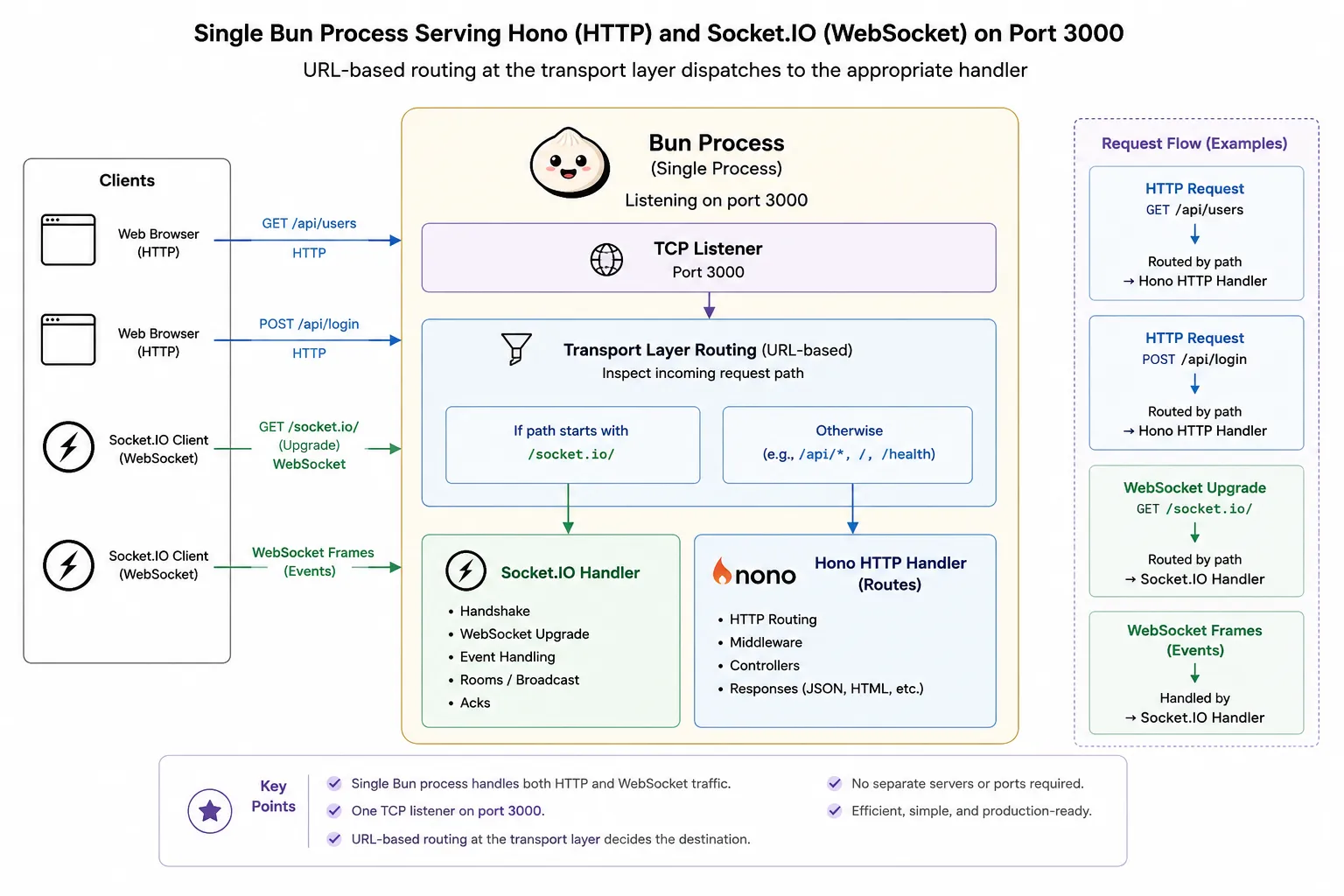
A single Bun process serves both HTTP and WebSocket through URL-based routing at the transport layer:
import { Server as SocketIOBunEngine } from '@socket.io/bun-engine';
import { Server as SocketIOServer } from 'socket.io';
import { app } from './hono-routes.js';

const io = new SocketIOServer();
const engine = new SocketIOBunEngine();
io.bind(engine);

const realtimeNamespace = io.of('/realtime');
realtimeNamespace.use(async (socket, next) => {
  const token = socket.handshake.auth?.token;
  const user = await authService.verifyToken(token);
  (socket as any).user = user;
  next();
});

export default {
  port: 3000,
  idleTimeout: 30,
  fetch(req, server) {
    const url = new URL(req.url);
    if (url.pathname === '/socket.io/') return engine.handleRequest(req, server);
    return app.fetch(req, server);
  },
  websocket: engine.handler().websocket,
};
One process. Hono handles HTTP. Socket.IO handles WebSocket. No proxy, no second port, no adapter layer between Bun and the WebSocket engine.
The Hono router mounts 30 sub-routers, each with its own middleware stack:
const app = new Hono<{ Variables: AppVariables }>();
app.use('*', cors({ origin: process.env.ALLOWED_ORIGINS?.split(',') }));
app.use('*', rateLimitMiddleware({ windowMs: 60_000, max: 100 }));
app.use('*', commonLoggerContextMiddleware);

app.route('/agent-protocol', agentProtocolApp);
app.route('/chat', chatApp);
app.route('/webhooks', webhooksApp);
// ... 27 more route groups
The /agent-protocol routes carry their own DI middleware and auth checking. The /webhooks routes have HMAC signature verification. No global service locator, no shared state between domains.
📦 Pattern 1: Typed Variables Eliminate Context Bugs
This is the feature that makes Hono fundamentally different from Express for multi-service AI platforms.
Define shared request context once:
export type AppVariables = {
  db: Database;
  container: DependencyContainer;
  user?: AuthUser;
  tenantId?: ObjectId;
};
Every c.get() and c.set() is checked at compile time across every middleware and handler. Sub-routers extend the base type with their own dependencies:
type AgentProtocolVariables = {
  agentProtocolService: AgentProtocolService;
  user?: { id: string };
  tenantId: ObjectId;
  authService: AuthService;
};
Each sub-app declares exactly what it needs. Access c.get('somethingUndefined') and TypeScript rejects it before the first test runs.
See the Hono middleware docs for the full API reference on typed variables.
💡 Unique Insight: We keep our shared
AppVariablestype in a single file imported by every route module. When a new dependency needs per-request context, we add it in one place and the compiler propagates the constraint across all 30 route groups. No runtime discovery. Noundefinedsurprises at 3am.
🔄 Pattern 2: SSE Streaming for Agent Communication
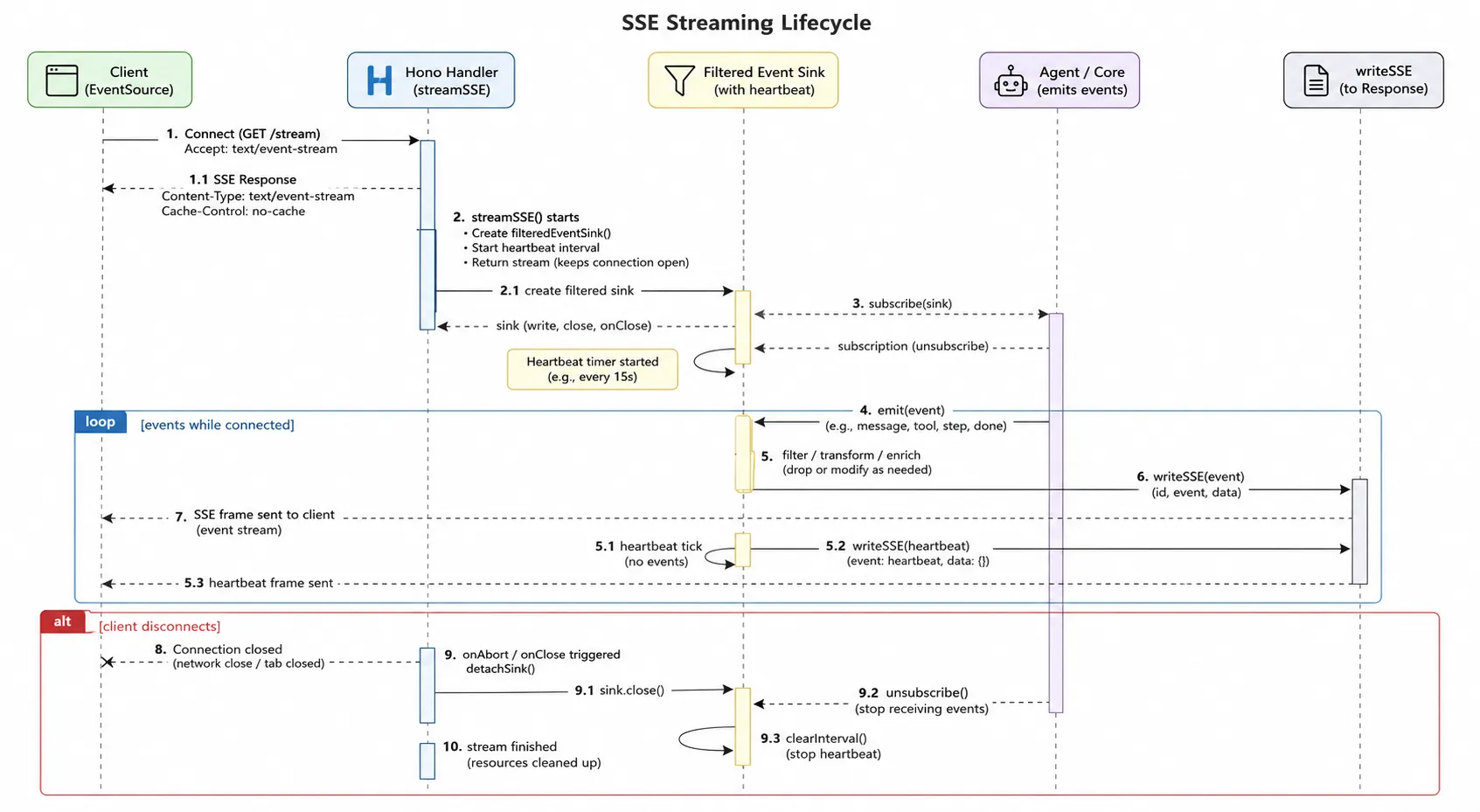
AI agents communicate in streams. Token-by-token LLM output, tool-call sequences, long-form reasoning — all map naturally to Server-Sent Events. Hono’s streamSSE helper handles the lifecycle with filtered event sinks and heartbeat management:
import { streamSSE } from 'hono/streaming';

app.post('/threads/:threadId/stream/events', async (c) => {
  const params = await c.req.json();
  const service = c.get('agentProtocolService');

  return streamSSE(c, async (stream) => {
    const sinkId = crypto.randomUUID();
    let detached = false;

    const detachSink = () => {
      if (detached) return;
      detached = true;
      service.detachEventSink(threadId, sinkId);
    };

    const send = async (event: any) => {
      if (detached || stream.aborted) return;
      try {
        await stream.writeSSE({
          id: event.event_id,
          event: event.method,
          data: JSON.stringify(event),
        });
      } catch {
        detachSink();
      }
    };

    await service.attachFilteredEventSink(threadId, {
      id: sinkId,
      filter: {
        channels: new Set(params.channels ?? ['messages', 'tools', 'lifecycle']),
        namespaces: params.namespaces,
      },
      send,
    });

    stream.onAbort(detachSink);

    const heartbeatTimer = setInterval(async () => {
      if (stream.aborted) return clearInterval(heartbeatTimer);
      await stream.writeSSE({ event: 'ping', data: '{"type":"heartbeat"}' });
    }, 30_000);

    await new Promise<void>((resolve) => {
      stream.onAbort(() => { detachSink(); resolve(); });
    });
  });
});
The 30-second heartbeat keeps connections alive through proxies and load balancers. The detachSink pattern prevents memory leaks when clients disconnect without a clean close — which happens often on mobile networks.
Bun’s HTTP server handles streaming bodies with zero configuration. No adapter, no special middleware.
💡 Unique Insight: The
detachSinkguard pattern was added after a production incident where a mobile client navigated away mid-stream. Without it, every aborted connection leaked an event sink subscription. Thestream.onAbortcallback fires reliably on Bun, but the async gap betweenstream.abortedchecks andwriteSSEcalls means you need both the flag and the callback for full coverage.
Refer to the Hono streaming docs for the streamSSE API reference.
🏖️ Pattern 3: Sandboxed Code Execution for AI-Generated Functions
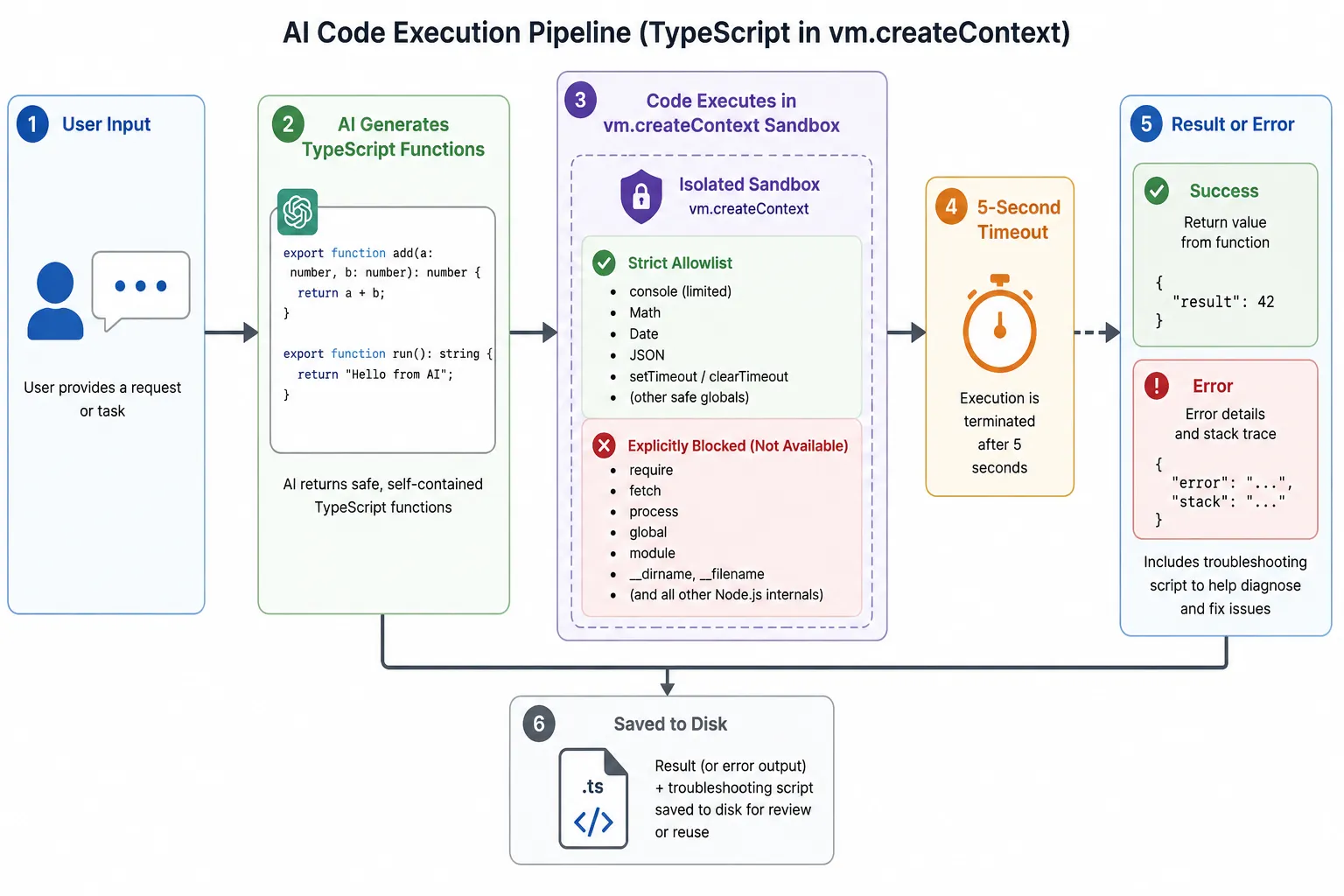
AI platforms that generate and execute code need sandboxing at the runtime level. The Node.js vm module provides this with a strict allowlist and hard timeout:
import * as vm from 'vm';

const SANDBOX_TIMEOUT_MS = 5000;

function executeCode<T>(code: string, input: unknown, functionName: string): T {
  const sandbox = {
    console: { log: (...args) => logger.debug(...args) },
    Date, Math, Array, Object, String, Number, Boolean, RegExp, JSON,
    Error, TypeError, ReferenceError, RangeError,
    parseInt, parseFloat, isNaN, isFinite,
  };

  const context = vm.createContext(sandbox, {
    name: 'Sandbox',
    codeGeneration: { strings: false, wasm: false },
  });

  const script = new vm.Script(
    `${code}\n__result__ = ${functionName};`,
    { filename: `sandbox-${functionName}.js` }
  );

  script.runInContext(context, { timeout: SANDBOX_TIMEOUT_MS });

  const runner = (sandbox as any).__result__;
  return Array.isArray(input) ? runner(...input) : runner(input);
}
Key constraints:
- Allowlist only:
Date,Math,Array,Object,JSON, basic error constructors,parseInt,parseFloat. Norequire, noimport, noeval, nofetch, noprocess. - No dynamic code generation:
codeGeneration: { strings: false, wasm: false }blocks eval-like patterns inside the sandbox. - Hard timeout: 5 seconds kills infinite loops. AI-generated code produces them more often than you’d expect.
When execution fails, save the script for debugging:
async function saveFailedScript(code: string, error: Error) {
  const filename = `failed-script-${Date.now()}.js`;
  await fs.mkdir('./troubleshooting-scripts', { recursive: true });
  await fs.writeFile(
    `./troubleshooting-scripts/${filename}`,
    `// Error: ${error.message}\n\n${code}`
  );
}
💡 Unique Insight: Three production edge cases caught this way: infinite loops from malformed recursion in generated code, NaN propagation from missing null checks, and a timeout from a generated function using
while(true). Without the saved scripts, each would have been a multi-hour debugging session. The troubleshooting directory is now the first place we look when a sandbox execution fails.
⚡ Pattern 4: Database Change Streams to WebSocket
Real-time event pipelines for AI platforms can be built without a message broker by chaining database change streams to WebSocket:
MongoDB ChangeStream (6 collections)
  → eventBus.emit() (typed EventEmitter, 27 event types)
    → Socket.IO adapter (listens to all 27 events)
      → Room emissions (tenant:*, conversation:*)
When a new message arrives through any channel (Telegram, Facebook, web form), the Change Stream detects the document, the event bus emits a typed event, and the Socket.IO adapter broadcasts to subscribers:
export function setupSocketIOAdapters(io: SocketIOServer) {
  eventBus.on('conversation:message:created', (event) => {
    io.to(`conversation:${event.conversationId}`)
      .emit('conversation:message:created', event);
  });

  eventBus.on('agent:status:changed', (event) => {
    io.to(`tenant:${event.tenantId}`)
      .emit('agent:status:changed', event);
  });
  // ... 25 more event types
}
No message broker, no Redis pub/sub. One process handles the full pipeline. When horizontal scaling becomes necessary, @socket.io/redis-adapter drops in without changing the event mapping layer — the adapter sits between Socket.IO and Redis, not between your code and Socket.IO.
See the MongoDB Change Streams docs for setup requirements (replica set, oplog access).
🛡️ Pattern 5: RFC 9457 Problem Details for Structured Errors
Standardised error responses save hours of debugging. The hono-problem-details package maps framework errors to RFC 9457 format:
app.onError(
  problemDetailsHandler({
    autoInstance: true,
    mapError: (error) => {
      if (error instanceof HTTPException && error.cause instanceof ZodError) {
        return {
          status: 422,
          title: 'Validation Error',
          detail: 'Request validation failed',
          extensions: {
            errors: error.cause.issues.map((issue) => ({
              field: issue.path.join('.'),
              message: issue.message,
              code: issue.code,
            })),
          },
        };
      }

      if (error instanceof LlmConfigError) {
        return { status: 404, title: 'LLM Configuration Not Found', detail: error.message };
      }

      if (error instanceof TenantError) {
        return { status: 409, title: error.message, detail: error.detail };
      }
    },
    localize: (pd, c) => {
      const correlationId = c.req.header('x-correlation-id');
      return { ...pd, correlationId, tenantId: c.get('tenantId')?.toString() };
    },
  }),
);
Every error response includes a correlation ID, tenant context, and structured validation details. When a client reports “the API returned an error,” you trace it to the exact request, tenant, and validation failure.
💡 Unique Insight: The
localizecallback inproblemDetailsHandleris the hook that solved our “which tenant broke?” problem. Before adding correlation IDs to every error response, debugging a multi-tenant incident meant grepping logs by timestamp range. Now every error carries its tenant context natively — including validation errors that hit before the tenant middleware runs (using thex-tenant-idheader directly from the request).
See the hono-problem-details docs for the full API.
🧩 Pattern 6: Dependency Injection by Dependency Level
When you register 100+ services, manual ordering becomes error-prone. Organising registrations by dependency level prevents circular resolution and makes the dependency graph explicit:
export function registerServices(container: DependencyContainer) {
  // Level 0 — no dependencies
  container.registerSingleton(EncryptionService);
  container.registerSingleton(DynamicRunnerService);

  // Level 1 — depends on Level 0
  container.registerSingleton(TenantStorage);
  container.registerSingleton(ApiKeyStorage);

  // Level 2 — depends on Levels 0–1
  container.registerSingleton(TenantService);
  container.registerSingleton(ApiKeyService);

  // ... through Level 7
}
Each route file resolves its own services through middleware, not a global locator:
const agentProtocolMiddleware = async (c: Context, next: Next) => {
  const service = container.resolve(AgentProtocolService);
  const authService = container.resolve(AuthService);
  c.set('agentProtocolService', service);
  c.set('authService', authService);
  await next();
};
No import-time side effects. Each middleware declares its dependencies explicitly. The DI container resolves them once at startup.
💡 Unique Insight: We use tsyringe with 8 dependency levels. Level 0 is pure utilities (encryption, sandbox runner). Level 7 is cross-cutting concerns (analytics, observability). The level comment at each registration makes circular dependencies immediately visible during code review — you can see at a glance whether a Level 2 service accidentally imports a Level 5 dependency.
⚠️ What Didn’t Work
Socket.IO on Bun needs @socket.io/bun-engine. The standard Socket.IO server assumes Node.js http.Server. The Bun-native adapter is at version 0.1.1 — it works, but expect rough edges around timeouts and connection handling. Test your reconnect logic thoroughly.
Some npm packages assume Node.js internals. Two issues in production: one package used process.nextTick in a way Bun handles differently, another expected fs.watch behaviour Bun doesn’t fully replicate. Both were fixable within a day, but worth checking your dependency tree before committing to Bun.
Hono’s type inference is strict by design. Change a middleware’s c.set() types and every downstream handler must match. This is the feature that prevents runtime bugs, but it means refactoring middleware requires touching more files than Express. Trade-off is worth it for correctness.
No production-ready image processing. Bun.Image exists but for serious workloads you’ll still want sharp or a dedicated service. The buffer-based approach works for light usage.
📊 Performance Numbers
Measured in production, not benchmarks:
| Metric | Value |
|---|---|
| Sandboxed function execution | 24ms |
| API response (with LLM) | 1–2s |
| Single document load (MongoDB) | 50ms |
| SSE heartbeat interval | 30s |
| Sandbox timeout | 5,000ms |
| Rate limit default | 100 req/60s |
The 24ms sandbox execution time matters because it separates deterministic business logic from LLM latency. Users get fast, consistent results for anything that doesn’t need an AI call. For a deeper look at the deployment costs behind these numbers, see How I Run a Production AI Startup for $30/Month.
📋 The Stack
| Layer | Technology | Version |
|---|---|---|
| Runtime | Bun | latest |
| HTTP framework | Hono | ^4.12.27 |
| WebSocket | Socket.IO + @socket.io/bun-engine | ^4.8.3 / ^0.1.1 |
| DI container | tsyringe | ^4.10.0 |
| Validation | Zod | 4.3.6 |
| Database | MongoDB native driver | ^7.3.0 |
| AI orchestration | LangChain + LangGraph | ^1.2.1 / ^1.4.6 |
| Logging | LogTape + OpenTelemetry | ^2.1.5 |
📋 When to Use This Stack
Use Hono + Bun when:
- You need compile-time type safety across middleware chains
- You want one process for HTTP, WebSocket, and background work
- You’re deploying to both edge and traditional servers from the same code
- Your team writes TypeScript and wants maximum compiler enforcement
Skip it when:
- You depend on npm packages that assume Node.js internals (audit your dependencies first)
- You need horizontal scaling on day one (plan the
@socket.io/redis-adapterintegration early) - Your team needs extensive battle-tested documentation (Hono’s docs are good but not Express-level)
For the original decision-making process behind choosing these tools, see Why I Picked Bun and Hono.
🗺️ What’s Next
Four improvements on the roadmap:
- Per-tenant rate limiting. AI platforms must prevent prompt-cost abuse. Hono’s middleware model makes this composable — key the limiter by tenant ID, not just IP.
- Streaming timeout handling. When an upstream LLM stalls mid-stream, the SSE connection hangs. The
streamSSEhandler needs backpressure-aware timeout logic. - Background workers. Offloading embedding generation and batch evaluation to
Bun.Workerthreads keeps the main request loop responsive. - Cost tracking middleware. Token-level accounting per request, surfaced via response hooks, gives tenants visibility into what their AI agents cost.
Each feature lands in the same Hono + Bun codebase. No framework migration. No rewrite.
That’s the point.
TL;DR
| Category | Pattern |
|---|---|
| Framework choice | Hono over Express, FastAPI, NestJS for AI workloads |
| Server architecture | Single Bun process, Hono HTTP + Socket.IO WebSocket on one port |
| Type safety | Typed AppVariables — compile-time enforcement across all middleware |
| Agent streaming | streamSSE with filtered event sinks, heartbeat, and detach-on-abort |
| Code sandboxing | vm.createContext() with strict allowlist, codeGeneration: false, 5s timeout |
| Real-time events | MongoDB ChangeStream → typed EventBus → Socket.IO rooms |
| Error handling | RFC 9457 Problem Details with correlation IDs and tenant context |
| DI | tsyringe with dependency levels to prevent circular resolution |
| Streaming | SSE for unidirectional agent events, WebSocket for bidirectional UI interactions |
Related Reading
- Why I Picked Bun and Hono — the original decision breakdown
- Determinism as Infrastructure — why AI platforms need deterministic execution
- How I Run a Production AI Startup for $30/Month — the deployment infrastructure behind these patterns
Frequently Asked Questions
Why choose Hono over Express for AI platforms? Hono ships in under 14KB with zero dependencies, provides compile-time TypeScript type inference for middleware variables, and runs on Bun, Deno, Cloudflare Workers, and Node.js without code changes. Express has middleware type safety as an afterthought and needs adapters for edge runtimes.
Is Bun production-ready for AI backend services? Bun handles production workloads including HTTP serving, WebSocket upgrades, MongoDB connections, and sandboxed code execution. The main gap is npm ecosystem maturity — some packages assume Node.js-specific internals. The Bun-native Socket.IO engine is at v0.1.1, so expect some rough edges.
How do you run AI-generated code safely in production?
Use Node.js vm.createContext() with a strict allowlist of globals (Date, Math, Array, Object, JSON), code generation disabled, and a 5-second timeout. The sandbox has no filesystem, network, or process access. Failed scripts get saved to disk with error context for debugging.
What is the difference between SSE and WebSocket for agent communication?
SSE is unidirectional server-to-client streaming — ideal for LLM token output and agent event streams. WebSocket is bidirectional — needed for typing indicators, real-time UI updates, and multi-agent orchestration where clients push events back. Hono supports both: streamSSE for SSE, and Socket.IO on the same Bun process for WebSocket.
How do you handle multi-tenant context in Hono middleware?
Define typed AppVariables on the Hono app with tenantId: ObjectId. Auth middleware extracts the tenant from the JWT or header and c.set('tenantId', ...). Every downstream handler accesses it via c.get('tenantId') — checked at compile time, no runtime lookups.
Tags: hono bun typescript ai-platform backend-architecture
Found this useful? Share it.
Related articles
Why I picked Bun and Hono for QuotyAI’s backend
Build faster backends by ditching NestJS for Bun and Hono - perfect for solo founders building AI products in 2026
Read articleVibe coding vs open source: The math has flipped
Stop wasting weeks learning libraries. Build exactly what you need faster with AI coding agents.
Read articleOpenWiki vs QuotyAI: Two LangChain DeepAgents Projects, Two Architectures
OpenWiki uses LangChain DeepAgents to generate agent documentation for codebases. QuotyAI uses the same createDeepAgent API to generate executable TypeScript business logic. A technical comparison of agent architecture, subagent patterns, and runtime execution.
Read article