
Why Naming Matters More Than Prompts When Coding with AI
Your variable names are your best prompt. How specific identifiers prevent AI from generating wrong code, and why 'data' is the worst thing you can call anything.
When you code with AI, your variable names are your best prompt. Not your system prompt. Not your instructions. The names you choose for functions, parameters, and variables.
Here’s why: the AI reads your code token by token. Every name it encounters constrains what it generates next. A function called handleData() gives the AI zero constraints. A function called dispatchWebRTCOmnichannelUIEvent() gives it almost no room to go wrong.
I build agentic AI systems with this approach, and the difference in output quality is dramatic.
The Problem with Generic Names
Most developers name things lazily. data, temp, result, id, msg. In traditional coding, this is bad practice but survivable — you have IDE autocomplete, team documentation, and your own memory.
With AI coding, lazy names actively hurt you. The AI treats each name as a probability distribution. msg could mean anything — a chat message, an email, a system alert, a log entry. So the AI picks whatever fits the surrounding context most loosely, and you get code that technically works but does the wrong thing.
Try this experiment: ask an AI to “implement a notification handler” with no context. Then ask it again, but name the function dispatchWebRTCOmnichannelUIEvent(). The first produces something generic and probably wrong. The second produces WebSockets code with low-latency event handling — because the name told it exactly what to build.
How Naming Constrains AI Generation
AI models process code as sequences of tokens. Each token narrows the probability space for the next one. When you use a specific name, you’re reducing the number of likely continuations.
incomingOmnichannelChatMessage has maybe a few hundred reasonable completions in training data. msg has millions. The more specific your name, the tighter the probability space, the more accurate the generation.
This isn’t theory. It’s how transformer architectures work.
Real Examples from QuotyAI
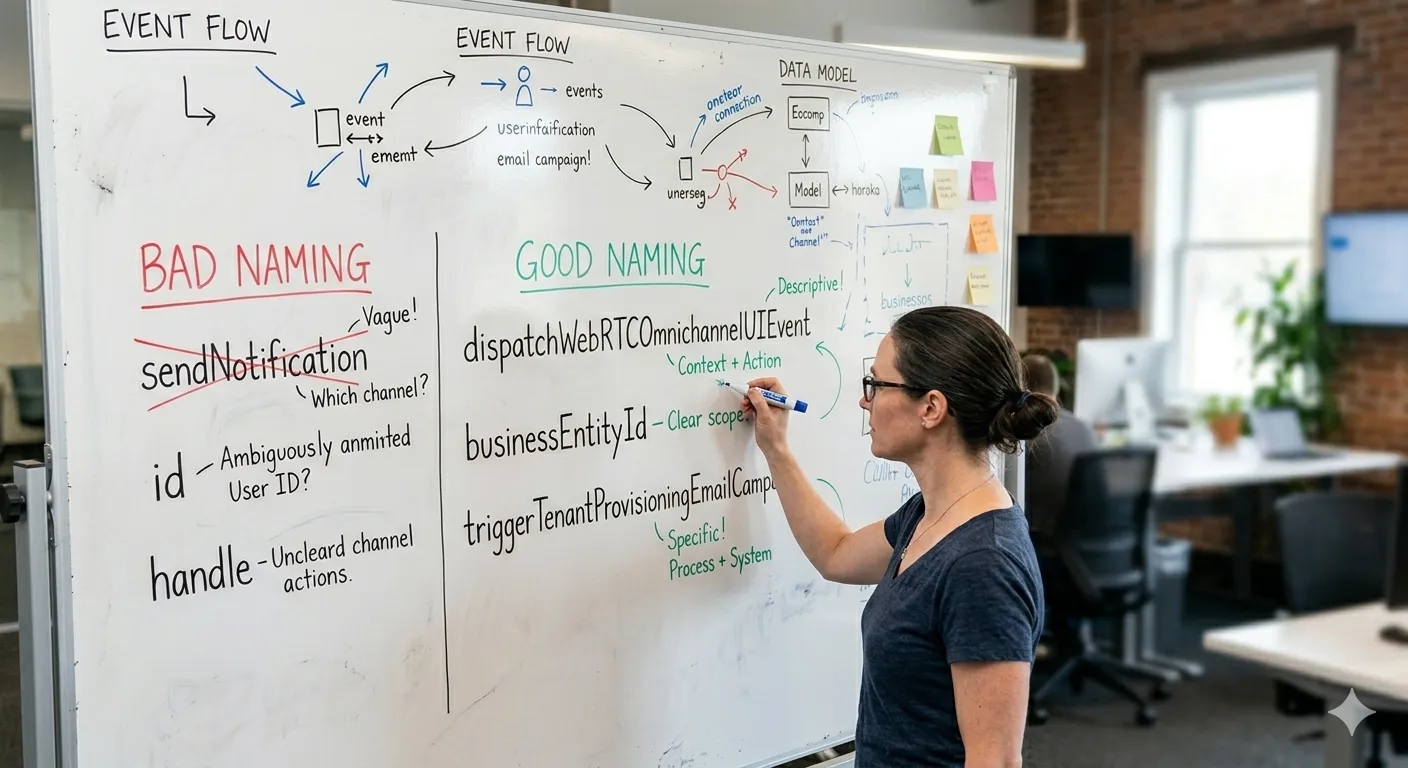
We don’t use generic names in our codebase. Every function name carries semantic weight:
-
Technical Infrastructure:
dispatchWebRTCOmnichannelUIEvent()tells the AI this is a real-time, low-latency client event. Not a batch job. Not an email. A WebSocket event. The MDN WebSockets API becomes the obvious reference. -
Business Logic:
postNewOrderToManagementChannel(paidOrderId, platform)forces the AI to generate integration code — Slack SDK calls, webhook payloads, channel routing. Not a console log. Not a database insert. -
Analytics:
triggerTenantProvisioningEmailCampaign(tenantDetails)puts the AI firmly in email automation territory. Drip sequences, onboarding flows, template rendering.
The pattern: the more specific the name, the less the AI has to guess.
Tests Are Not Enough

A common approach: write tests first, let AI make them pass. The tests pass, so the code must be good.
Wrong. Tests verify that your code does what the tests say. If the tests are vague — expect(result).toBeDefined() — the AI will generate code that passes the test but does nothing useful. You have a green bar and broken code.
Tests prevent structural collapse. Naming determines what the code actually becomes.
When you rename handleStuff() to calculateMonthlyRecurringRevenue(subscriptionId, billingCycle), the AI suddenly knows it needs to: look up the subscription, find the billing cycle, calculate MRR, and return a number. The test can then assert on the actual business logic, not just “it returned something.”
The grep Test
Try this in a codebase with generic names:
grep -r "notify" .You get 400 results. None of them are the one you want. You read each one, trying to figure out which notify handles Slack vs email vs push vs webhook.
Now try with specific names:
grep -r "dispatchWebRTCOmnichannelUIEvent" .Three results. The definition, the call site, and the test. That’s it.
Specific names make your codebase navigable for you and for the AI. When the AI needs to find where something is defined, a specific name gives it a direct hit. A generic name gives it a list of guesses.
The Refactoring Shortcut
Here’s the most practical trick: when AI generates wrong code, don’t rewrite the prompt. Rename the variables.
If the AI generates a function that mixes up authentication tokens with session IDs, rename userId to firebaseAuthUid and sessionId to livekitWebRTCToken. The AI will often correct itself on the next generation — the new names constrain its output to the right domain.
This works because you’re giving the AI better signals with every token. It’s faster than writing a longer prompt, and it compounds: every rename makes the entire codebase clearer for future AI generations.
export class CrossTenantAnalyticalEventNotificationService {
  private readonly logger = getLogger(CrossTenantAnalyticalEventNotificationService.name);

  constructor(
    private readonly telegramSdkService: TelegramSdkService,
    private readonly facebookSdkService: FacebookSdkService
  ) {}

  // The class name alone tells the AI this handles cross-tenant notifications
  // via Telegram and Facebook. No further context needed.
}
Three Rules for AI-Friendly Naming
-
Be specific, not clever:
calculateMonthlyRecurringRevenue()beatscalcMRR()and destroyscalculateStuff(). The AI needs the full words to understand intent. -
Use domain terms, not infrastructure terms:
orderCreatedSlackNotification()beatssendAlert(). The AI knows Slack has a specific SDK, specific message formats, specific API limits.alertcould mean anything. -
When AI output is wrong, rename before you prompt: Change the variable names in your code. It’s usually faster than writing a better prompt, and the fix sticks for every future generation.
Frequently Asked Questions
Why does my AI coding assistant generate wrong functions?
AI struggles when variable names are generic. Names like id or data give no context, so the AI guesses. Specific names like firebaseUserId or incomingOmnichannelChatMessage tell the AI exactly what the data is, reducing wrong assumptions.
How do I stop AI from generating hallucinated code?
Replace generic parameters with specific ones. Instead of passing (userId), pass (firebaseUserId, webrtcSessionId). The specific names constrain what the AI generates — it won’t mix up authentication IDs with session tokens.
Are variable names more important than prompts? For AI code generation, yes. Prompts set the stage, but variable names are constant context that the AI reads with every line. A well-named function guides the AI through hundreds of lines of generated code without needing repeated instructions.
Found this useful? Share it.
Related articles
Stop Asking Which Model Is Smartest: DeepSeek V4 Flash, Qwen3.8-Max, and the 'Good Enough' Era
DeepSeek V4 Flash is nearly free. Qwen3.8-Max is nearly frontier-scale. Together they mark the shift from 'which model is smartest' to 'how much intelligence per dollar' — and why model routing is now core architecture.
Read articleHono Grew From 1.5M to 57M Weekly npm Downloads in a Year. Here's Why.
Hono's weekly npm downloads grew ~39x in 12 months — from 1.5M to 57.5M. The release history explains it: relentless performance work, write-once-run-anywhere portability, and the AI-agent era making Hono the default.
Read articleAnthropic Removed 80% of Claude Code's System Prompt. You Should Prompt Less Too.
Claude 5 generation models are smart enough that over-prompting hurts performance. Here's what Anthropic learned — and how to apply it.
Read article